
hashtechwave-light
  • AI
  • Computing
  • Mobile
  • Gaming
    • NYT Games
    • Roblox Codes
    • GTA
  • How-To
  • Entertainment
    • Amazon Prime
    • Netflix
  • Gadget
  • News
Saturday, Jan 17, 2026
Notification
Font ResizerAa
HashTechWaveHashTechWave
  • Artificial Intelligence
  • Automobile
  • Computing
  • Entertainment
  • Gadget
  • How-To
  • Gaming
  • Mobile
  • News
Search
  • Artificial Intelligence
  • Automobile
  • Computing
  • Entertainment
  • Gadget
  • How-To
  • Gaming
    • Roblox Codes
    • NYT Games
  • Mobile
  • News
Have an existing account? Sign In
Follow US
© HashTechWave News Network. HashBitStudio Company. All Rights Reserved.
HashTechWave > Blog > Mobile > Is Your Phone Getting Android 16 QPR2 Update? Full List of Supported Pixel Devices
Mobile

Is Your Phone Getting Android 16 QPR2 Update? Full List of Supported Pixel Devices

raza zaidi is a roblox gamer and anime lover
Last updated: December 6, 2025 3:32 pm
By
Raza Zaidi
raza zaidi is a roblox gamer and anime lover
ByRaza Zaidi
Anime & Manhwa Content Writer
Raza Zaidi is a writer at HashTechWave who lives at the verge of anime and gaming. Whether it’s breaking down the latest Solo Leveling twist, exploring...
Follow:
5 Min Read
SHARE

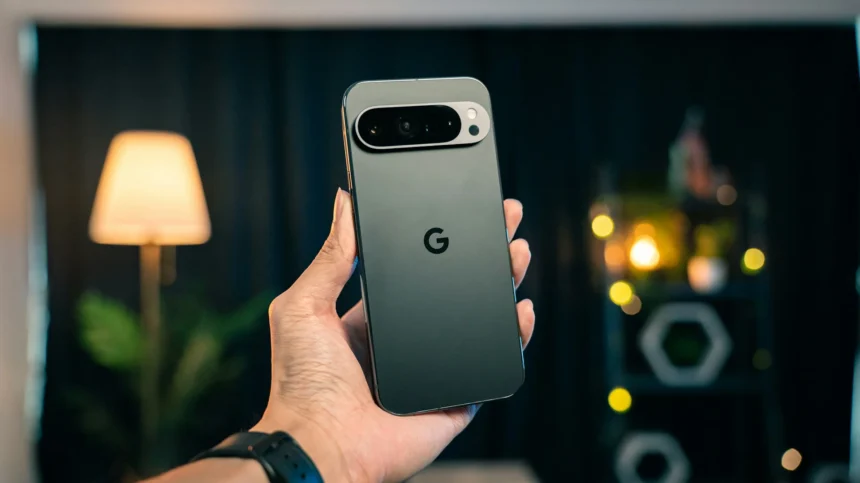
The Android 16 QPR2 update is rolling out now in December 2025 Pixel Feature Drop. If you own a supported Pixel model then this update brings performance tweaks, UI refinements and important security patches from Google. But which models are eligible and what should you do if your update hasn’t arrived yet?

Contents
  • What is Android 16 QPR2?
  • Full List: Every Pixel Phone Getting Android 16 QPR2
    • Don’t see your phone?
  • How to Check and Install the Update
    • Installation Tips
    • Why haven’t I received the Android 16 update yet?
    • Will this Android 16 update delete my data?
    • My Pixel is on the list but says “Up to date.” What do I do?

This quick guide lists every phone confirmed to receive Android 16 QPR2 so you can check your eligibility in seconds. Once you’ve confirmed your device is on the list, head over to our deep-dive guide Android 16 QPR2 for Mobile Gamers to see how this update boosts performance and stability for your favorite games.

What is Android 16 QPR2?

Android 16 QPR2 (Quarterly Platform Release 2) is a significant mid-cycle update for Google Pixel devices. Unlike standard monthly security patches that only fix bugs, QPR updates introduce user-facing features, interface polish and deeper system optimizations.

- Advertisement -
  • Release Date: Starting early December 2025​
  • Availability: Exclusive to Google Pixel devices first; other manufacturers (Samsung, OnePlus, etc.) will integrate these changes into their own Android skins later.

Note: If you see a “December 2025 Update” notification on your Pixel running Android 16, that is the QPR2 build.

Full List: Every Pixel Phone Getting Android 16 QPR2

Device SeriesSupported Models
Pixel 9 SeriesPixel 9, Pixel 9 Pro, Pixel 9 Pro XL, Pixel 9 Pro Fold
Pixel 8 SeriesPixel 8, Pixel 8 Pro, Pixel 8a
Pixel 7 SeriesPixel 7, Pixel 7 Pro, Pixel 7a
Pixel 6 SeriesPixel 6, Pixel 6 Pro, Pixel 6a
Pixel Fold/TabletGoogle Pixel Fold (1st Gen), Pixel Tablet

Read Next: Google Pixel 9 vs Pixel 8: Features of Latest Flagship

Don’t see your phone?

Older devices like the Pixel 5a and earlier have reached their end-of-life for major Android OS updates and will not receive QPR2, though some may still get separate security patches if promised.

- Advertisement -

More Read

iPhone 12 Pro Max
Is the iPhone 12 Pro Max Still Worth Buying in 2026? Complete Guide
Oppo A6 Series Full Review in 2026: Complete Comparison of All Models
Android 16 QPR2 for Mobile Gamers: Performance, Battery Life and Best Settings After the Update

How to Check and Install the Update

Even if your phone is on the list, Google rolls out updates in phases. You might not see it immediately. Here is how to force a check:

  1. Open your phone’s Settings.
  2. Scroll down and tap System.
  3. Tap Software updates then System update.
  4. Tap the Check for update button.

If the system finds the update, you will see a prompt to download and install Android 16 QPR2.

- Advertisement -

Installation Tips

  • Battery: Ensure you have at least 50% charge or keep the phone plugged in.
  • Wi-Fi: Use a stable Wi-Fi connection as the file size can be large (often 400MB+).
  • Patience: The “optimizing apps” stage can take 10–20 minutes. Do not restart your phone during this process.

If your Pixel appears in this list, you are all set to enjoy the latest Android 16 improvements as soon as the QPR2 update reaches your device. Take a minute to back up your data, check for the OTA, and then explore the new features once the installation is complete.

Why haven’t I received the Android 16 update yet?

Google rolls out updates in waves over a few weeks. Your carrier or region might just be later in the queue. Keep checking manually every few days.

Will this Android 16 update delete my data?

No, this is a standard system update. Your photos, apps, and files stay safe. However, it’s always smart to back up important data before any major update.

My Pixel is on the list but says “Up to date.” What do I do?

Try restarting your phone and checking again. If that doesn’t work, you simply have to wait for the rollout to reach your device ID. There is no safe way to force it faster.
- Advertisement -
TAGGED:AndroidAndroid GuidePixel

Sign Up For Daily Newsletter

Be keep up! Get the latest breaking news delivered straight to your inbox.
Join Newsletter Join on Whatsapp
raza zaidi is a roblox gamer and anime lover
ByRaza Zaidi
Anime & Manhwa Content Writer
Follow:
Raza Zaidi is a writer at HashTechWave who lives at the verge of anime and gaming. Whether it’s breaking down the latest Solo Leveling twist, exploring Los Santos in GTA or ranking anime-inspired Roblox games, he brings both passion and perspective to every piece. He followed open-world games since the PS2 era and still gets pulled into side quests more than he’d admit. When he's not bingeing episodes on Crunchyroll, you’ll find him testing mods, chasing game deals, or revisiting classic open worlds, this time with ray tracing on.
Previous Article Android 16 QPR2 for Mobile Gamers Performance, Battery Life and Best Settings After the Update Android 16 QPR2 for Mobile Gamers: Performance, Battery Life and Best Settings After the Update
Next Article oppo a6, a6 pro and a6 pro max review Oppo A6 Series Full Review in 2026: Complete Comparison of All Models

Follow US

Find US on Social Medias
FacebookLike
XFollow
YoutubeSubscribe
ThreadsFollow
BlueskyFollow
Popular News
NYT Strands game #684 puzzle - Jan 16, 2026
NYT Strands Hints, Answers and Spangram Today of Jan 16, 2026
Sarah Thompson
By Sarah Thompson
January 16, 2026
Today’s NYT Wordle Hints & Answer of Jan 16 (Solution #1672)
NYT Connections Hints & Answers (#949) for Jan 15, 2026 Solution
NYT Spelling Bee Answers & Pangram For January 16, 2026
Universal Piece Codes (January 2026) – Get Free Gems, Yen & Boosts

You Might Also Like

How to Recover Deleted WhatsApp Messages Using the WAMR App
How-ToMobile

How to Recover Deleted WhatsApp Messages of iOS and Android

By Syed Safwan Abbas
5 Min Read
Apple iPhone 17 & iPhone 17 Air
Mobile

Apple iPhone 17 & iPhone 17 Air: What to expect in 2025

By Syed Safwan Abbas
9 Min Read
Infinix GT 30 Pro Released
Mobile

Infinix GT 30 Pro Review: Budget Gaming Beast or Just Hype?

By Syed Safwan Abbas
7 Min Read
hashtechwave-light

Your trusted source for gaming insights, technology updates, digital trends, and industry news. We deliver helpful guides, reviews, and updates to keep you informed in today’s fast-moving digital world.

Categories

  • Artificial Intelligence
  • Computing
  • Gaming
  • Entertainment
  • Gadget
  • How-To

Quick Links

  • Cookies Policy
  • Disclaimer
  • Privacy Policy
  • Terms and Condition

© 2025 HashTechWave. All rights reserved.

Join Us!
Subscribe to our newsletter and never miss our latest news, podcasts etc..
[fluentform id="6"]
Zero spam, Unsubscribe at any time.
adbanner
hashtechwave mobile
Welcome Back!

Sign in to your account

Username or Email Address
Password

Lost your password?