FREE MEETING: KEY TRENDS AND RISKS IN NFT GAMES– REGISTER

  • Blog
  • About us
  • Contact Us
  • Newsletter
Reading: How to Get 120 FPS in PUBG Mobile Gameloop Emulator – Step by Step Guide
Share
HTW Logo Daymode HTW Logo Nightmode
  • BOOKMARKS
  • AI
  • Computing
  • Mobile
  • Gaming
    • NYT Games
    • Roblox Codes
    • GTA
  • How-To
  • Entertainment
    • Amazon Prime
    • Netflix
  • Gadget
  • News
Reading: How to Get 120 FPS in PUBG Mobile Gameloop Emulator – Step by Step Guide
Share
  • bitcoinBitcoin(BTC)$66,421.70-1.19%
  • ethereumEthereum(ETH)$1,944.24-1.56%
  • tetherTether USDt(USDT)$1.000.00%
  • rippleXRP(XRP)$1.36-1.59%
  • binancecoinBNB(BNB)$599.42-2.57%
  • usd-coinUSDC(USDC)$1.000.01%
  • solanaSolana(SOL)$78.96-2.01%
  • tronTRON(TRX)$0.278266-0.40%
  • dogecoinDogecoin(DOGE)$0.0932730.75%
  • bitcoin-cashBitcoin Cash(BCH)$511.900.69%
Font ResizerAa
HashTechWaveHashTechWave
Search
  • Artificial Intelligence
  • Automobile
  • Computing
  • Entertainment
  • Gadget
  • How-To
  • Gaming
    • Roblox Codes
    • NYT Games
  • Mobile
  • News
Have an existing account? Sign In
Follow US
© Foxiz News Network. Ruby Design Company. All Rights Reserved.
HashTechWave > Blog > How-To > How to Get 120 FPS in PUBG Mobile Gameloop Emulator – Step by Step Guide
How-ToGaming

How to Get 120 FPS in PUBG Mobile Gameloop Emulator – Step by Step Guide

Sarah Thompson
Last updated: June 18, 2025 4:08 pm
Sarah Thompson - Puzzle & Word Game Editor at HashTechWave
Published: January 14, 2025
Share
pubg mobile wallpaper 4k 120 fps gameloop - hashtechwave

Since the release of PUBG Mobile 3.2 Mecha Fusion, players on mobile devices have unlocked the ability to enjoy gameplay at 120 FPS. But what, if you could take it a step further and experience the same buttery-smooth frame rates on your PC using the GameLoop emulator?

Contents
  • Step by Step Guide to Get 120 FPS on Gameloop Emulator
    • Step 1: Configure the Device Model in GameLoop Settings
    • Step 2: Properly Close GameLoop Emulator and End Related Processes
    • Step 3: Create a Shortcut of AndroidEmulatorEn
    • Step 4: Modify the Shortcut to Enable Advanced FPS Settings
    • Step 5: Launch PUBG Mobile on GameLoop Emulator
    • Concluding Step: Enable 120 FPS in PUBG Mobile Settings
  • Bonus Tips for Stable 120 FPS in Gameloop Emulator
    • Ideal GameLoop Emulator Setting

You May Also Like: PUBG Mobile Hits 120 FPS – But Can Your Phone Support?

In this guide, we’ll show you how to optimize your gameloop emulator settings to get 120 FPS with ultra-responsive gameplay and that will improve your aim and eliminate frame drops. Follow below step by step guide to dominate the battlegrounds like never before!

Step by Step Guide to Get 120 FPS on Gameloop Emulator
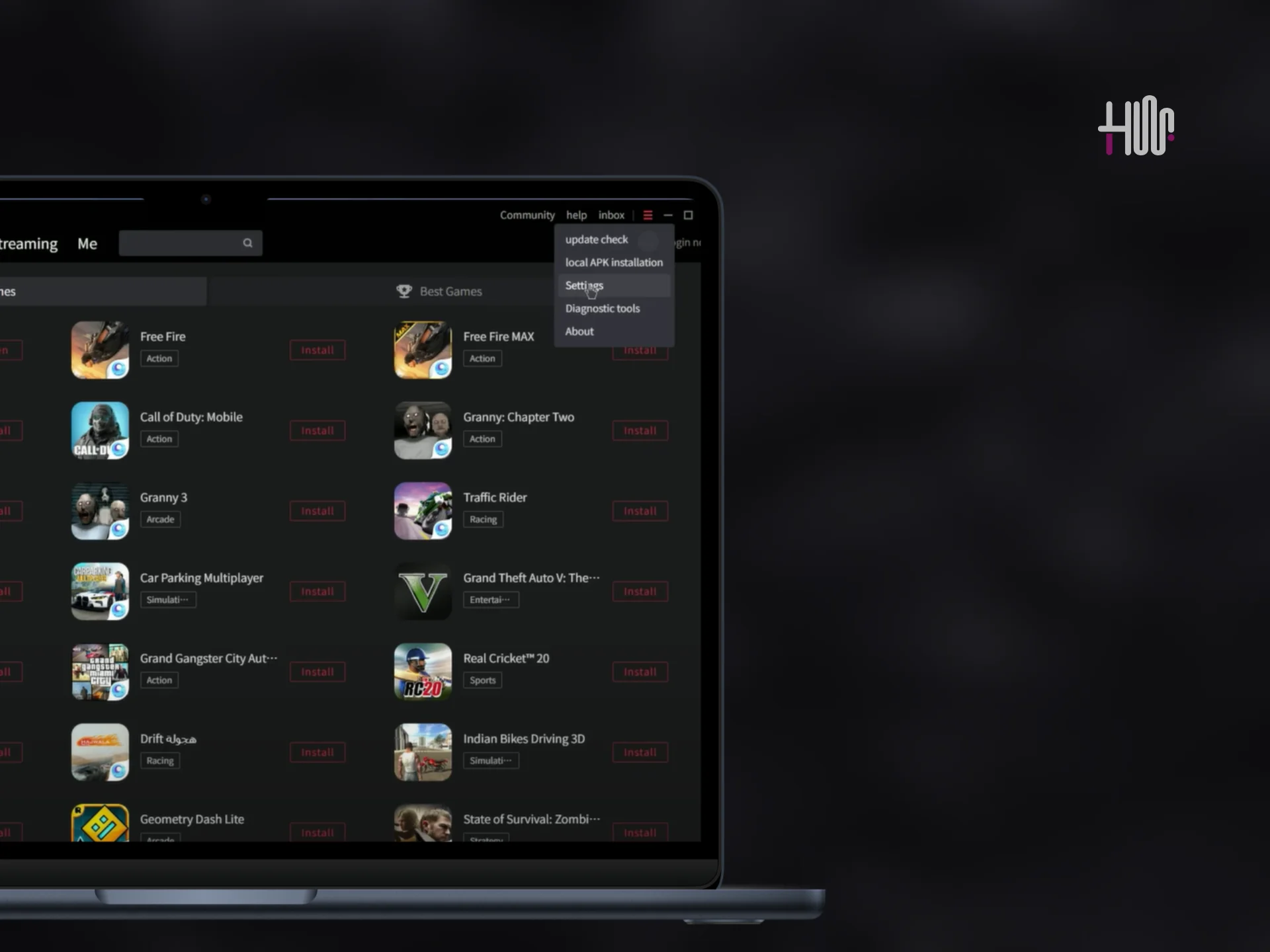
gameloop emulator settings for 120 fps - hashtectwave
Image Credits: Hashtechwave (Gameloop Settings)

Step 1: Configure the Device Model in GameLoop Settings

First, let’s customize the device model to enable compatibility with higher FPS.

  1. Open the GameLoop settings.
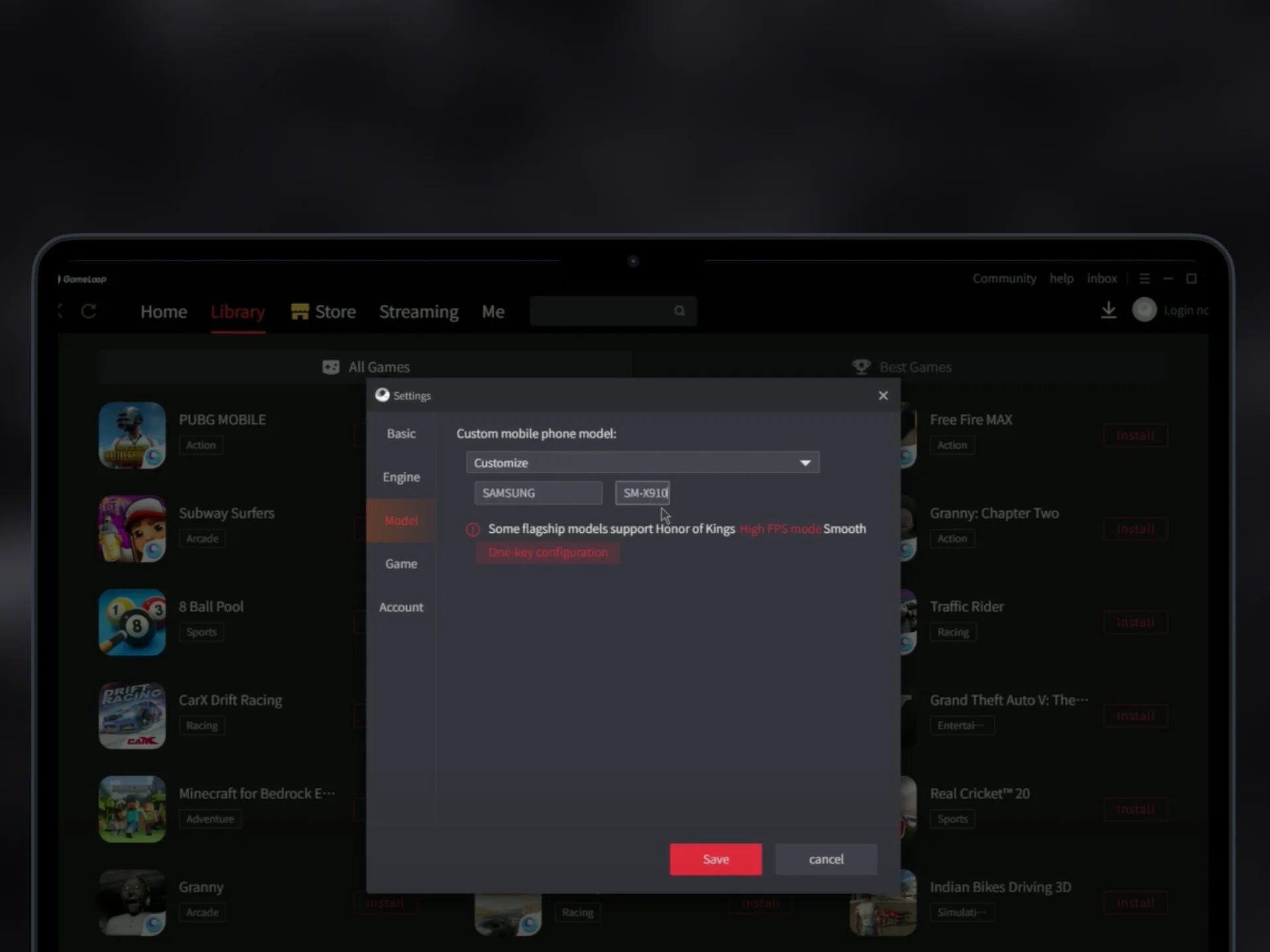
  2. Navigate to the Model tab and change the model to Custom.
  3. Select Samsung SM-X910 as your device model from the dropdown (refer to the image below).
  4. Save your changes.
gameloop emulator model change - hashtechwave
Image Credits: HashTechWave

Pro Tip

Configuring the device model to a high-end one like Samsung SM-X910 tricks the game into enabling advanced graphical features and higher FPS.

Step 2: Properly Close GameLoop Emulator and End Related Processes

To apply changes, you’ll need to fully close the emulator:

  1. Close the emulator from the system tray.
  2. Open the Task Manager (press Ctrl + Alt + Delete) and end the Chinese language app process related to GameLoop.
  3. Make sure all emulator-related tasks are terminated.

Fully shutting down the emulator ensures that changes made to the settings take effect when you relaunch it.
gameloop emulator 120 fps pubg mobile - hashtechwave
Image Credits: Safwan Abbas

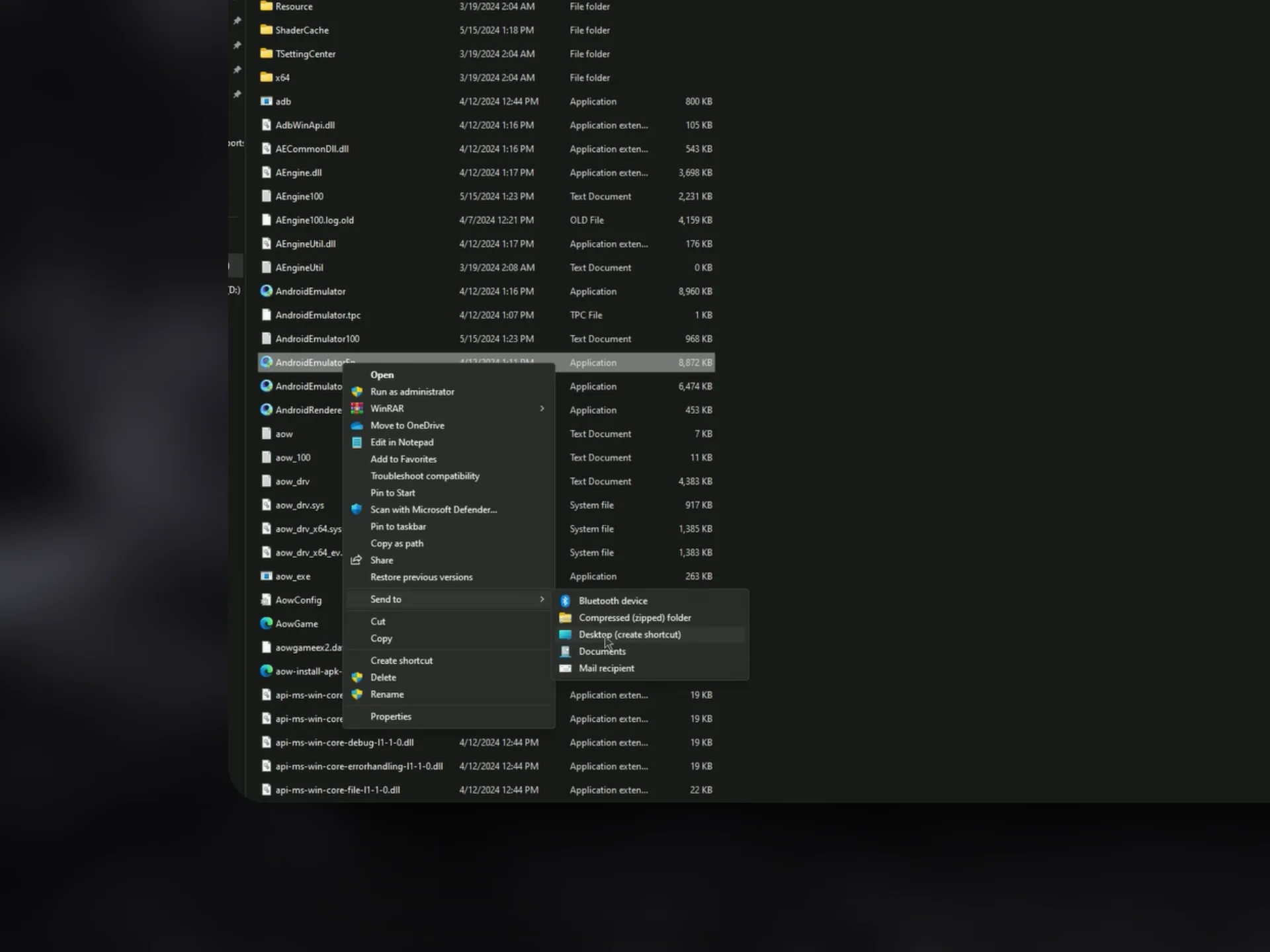
Step 3: Create a Shortcut of AndroidEmulatorEn

Next, locate the emulator’s core file and create a shortcut for it:

  1. Navigate to the installation folder of GameLoop.
  2. Find the file named AndroidEmulatorEn.
  3. Create a shortcut for this file and place it on your desktop.

Step 4: Modify the Shortcut to Enable Advanced FPS Settings

Let’s add a custom command to unlock higher frame rates. For this you have to Right-Click on AndroidEmulatorEn Shortcut that you just created and edit the Target field like this:

-vm 100

Make sure to add one whitespace before adding above parameter and then press Ok to apply settings.

Note

Why This Works: Adding -vm 100 optimizes the emulator’s virtual memory usage, enabling smoother gameplay and higher FPS.

Step 5: Launch PUBG Mobile on GameLoop Emulator

Now you’re ready to experience PUBG Mobile at its finest. Open the emulator using the AndroidEmulatorEn shortcut and then launch PUBG Mobile app. Although this will display a dialog box with a message “The current game requires setting the model to ASUS_I001DA to deliver a better experience. Do you want to restart Gameloop and switch?”. You have to choose cancel everytime it seems to appear on Gameloop emulator.

Concluding Step: Enable 120 FPS in PUBG Mobile Settings

Once you successfully follow all the steps and reached to the last step. You just only have to change the Graphics settings of Combat to Ultra Extreme option, which enables 120 FPS. Although in Lobby you will maximum get 90 FPS which you can see by using Gameloop Emulator FPS Meter.

Bonus Tips for Stable 120 FPS in Gameloop Emulator

While the above steps will unlock 120 FPS, optimizing your PC and emulator settings further ensures smooth and consistent performance. Here are some bonus tips:

  • To get Stable 120 FPS experience, your PC should have at least 16GB RAM or higher.
  • If you’re running low on RAM, consider closing background apps or upgrading your system’s memory to reduce resource bottlenecks.

Ideal GameLoop Emulator Setting

SettingsConfiguration
Rendering OptionDirectX+ (Nvidia) and OpenGL+ (AMD)
Anti-AliasingBalanced
Memory AllocationSet 4096MB If 8GB RAM Installed
Set 8192MB If 16GB RAM
Processor AllocationSet to Max
Screen Resolutions1280×720 for faster performance or 1920×1080 (Recommended) for a balance between visuals and FPS.
Screen DPIEnsure the DPI setting is at 240 or 320 for responsive aiming without overloading the system.

You can install Gameloop and PUBG Mobile on SSD Storage for faster read write speed and that is smallest but more effective element in Game Performance. By Applying all these configurations and having ideal system requirements. You will get stable 120 FPS on Gameloop Emulator. But If you have questions or face any challenges? DM us on Instagram or Facebook

Editor’s Recommendation:

  • Infinix GT 30 Pro Review: Budget Gaming Beast or Just Hype?
  • Should You Buy Apple iPad 8th Generation in 2025 For Gaming?
  • Infinix GT20 Pro: Gamer on a Budget For PUBG Lovers
  • Ultimate Guide To Choose Best SSD for PC: Types and Features
All Working Roblox Jump Rope Codes (Sep 2025) – Free Claims
Squid Game The Final Games Codes: Free Won & Hidden Bonus
Roblox The Hatch 2025 Event: Start Date, Games List, Rewards
Roblox Chat Update 2026: Age Check Required to Chat + How to Fix Voice Chat
How to Get Candy Corn Grow a Garden Halloween Event 2025
TAGGED:PC GamesPUBG

Sign Up For Daily Newsletter

Be keep up! Get the latest breaking news delivered straight to your inbox.
By signing up, you agree to our Terms of Use and acknowledge the data practices in our Privacy Policy. You may unsubscribe at any time.
Share This Article
Facebook Email Copy Link Print
Avatar of Sarah Thompson
BySarah Thompson
Puzzle & Word Game Editor at HashTechWave
Follow:
Sarah Thompson is a puzzle and word game expert who’s been covering NYT Games like Wordle, Strands, and Connections since 2023. She is well known for her reliable answers for daily puzzle and tips on HashTechWave, she helps readers keep their streaks alive with confidence. Sarah blends her love for logic games and language into guides that are both quick and beginner-friendly. Off the grid, you’ll find her into cozy games, lo-fi beats, and weekend trivia nights.
Previous Article solo leveling season 2 leaks release date and animated visuals 2024 What’s New in Solo Leveling Season 2: Leaks & Release Date
Next Article ps5 pro and controller PS5 Pro vs PS5: Exciting Specs & Price for Gamers – Who Wins Consoles War (2025)

Follow US

Find US on Socials
Facebook Twitter Instagram
Subscribe to our newsletter

Get Newest Articles Instantly!

Subscription Form

- Advertisement -
Ad image
Popular News
Wordle hints today (#1677) for Jan 21, 2026 answer
Today’s NYT Wordle Hints & Answer of Feb 13 (Solution #1700)
Today NYT Connections Hints & Answers
NYT Connections Today: Hints & Answers For Feb 13, 2026 (Puzzle #978)
NYT Strands game #712 puzzle - Feb 13, 2026
NYT Strands Today Hints, Spangram & Answers For Feb 13, 2026

Follow Us on Socials

We use social media to react to breaking news, update supporters and share information

Twitter Linkedin Whatsapp Threads Instagram
HTW Logo Daymode HTW Logo Nightmode

Delivers trusted tech news, gaming guides, Roblox updates, and digital insights for everyday readers.

Hot News
OpenClaw Security Risks: Hype vs Reality Guide (2026)
Breaking: Notepad++ Update Hijacked by State Hackers
Intrepid Studios Implodes: Team Resign Hit Ashes of Creation
Highguard Shieldbreaker Locations: All Map Spawns & Timers Guide (2026)
Moltbot & Mac Mini Guide: This Duo Is Taking Over AI (2026)

Subscribe to our newsletter

You can be the first to find out the latest news and tips about trading, markets...

Subscription Form

Legal

  • Cookies Policy
  • Disclaimer
  • Privacy Policy
  • Terms and Condition

Company

  • Editorial Policy
  • Submit PR or Sponsored Article
  • About Us
  • Contact Us
© HashTechMedia Network. HashTechWave. All Rights Reserved.
Join Us!
Subscribe to our newsletter and never miss our latest news, podcasts etc..
Subscription Form

Zero spam, Unsubscribe at any time.
Welcome Back!

Sign in to your account

Username or Email Address
Password

Lost your password?