
The massive Roblox chat update of January 2026, Roblox has rolled out mandatory age verification for access to Voice Chat and Expressive text features globally. Users must verify their age via a government ID or a facial video selfie (processed by vendor Persona) to unlock these features. Unverified users may face restricted chat options (e.g. “Friends Only” or pre-set phrases) depending on their region.
Also Read: How to do Cloud Gaming 2026 and Play AAA PC Games on Android & Low-End Laptops
The Silent Roblox Chat Update: Why You Suddenly Can’t Chat?
If you logged into Roblox this week and found your microphone grayed out or your text chat restricted, you aren’t banned, you just haven’t passed the new checkpoint. Roblox chat update is arguably its biggest communication overhaul in a decade. Moving away from simple email verification, the platform is now enforcing biometric and ID-based age checks to segregate players into safety tiers. This move aims to protect younger users while unlocking “17+ exclusive” social features for adults.
Here is everything you need to know about the update, the new AI features and how to get your voice back.
1. The Three Tiers of Roblox Chat
Gone are the days of a single chat system. The Roblox chat update 2026 solidifies three distinct communication experiences. Check the table below to see where you fit.
| Feature | Under 9 | 9–12 | 13–15 | 16–17 | 18–20 | 21+ |
|---|---|---|---|---|---|---|
| Age check needed to unlock chat | Yes (plus parent consent). | Yes | Yes | Yes | Yes | Yes |
| Default chat behavior | Experience chat is off by default unless a parent provides consent after an age check. | Age-based chat (you chat with similar age groups). | Age-based chat (you chat with similar age groups). | Age-based chat (you chat with similar age groups). | Age-based chat (you chat with similar age groups). | Age-based chat (you chat with similar age groups). |
| Who you can chat with (simple) | Mostly restricted; parent-controlled for enabling experience chat. | Your age group + nearby age groups. | Your age group + nearby age groups. | Your age group + nearby age groups. | Your age group + nearby age groups. | Your age group + nearby age groups. |
| Trusted Connections | Not the focus for this group (Roblox highlights it for 13+). | Not the focus for this group (Roblox highlights it for 13+). | Available for age-checked users 13+ to chat more freely with people they know. | Available for age-checked users 13+ to chat more freely with people they know. | Available for age-checked users 13+ to chat more freely with people they know. | Available for age-checked users 13+ to chat more freely with people they know. |
| How to pass the age check | Facial age estimation (selfie/video) is used; data is deleted after processing. | Facial age estimation (selfie/video) is used; data is deleted after processing. | Facial age estimation, or ID verification if you’re 13+. | Facial age estimation, or ID verification if you’re 13+. | Facial age estimation, or ID verification if you’re 13+. | Facial age estimation, or ID verification if you’re 13+. |
What is Tier 3 Expressive? Users in Tier 3 gain access to 17+ dating chat features (in simulated social spaces) and mature horror genres that were previously banned. This level allows for more complex, unfiltered conversations, which is why the ID check is strict.
2. How to Verify (And Is It Safe?)
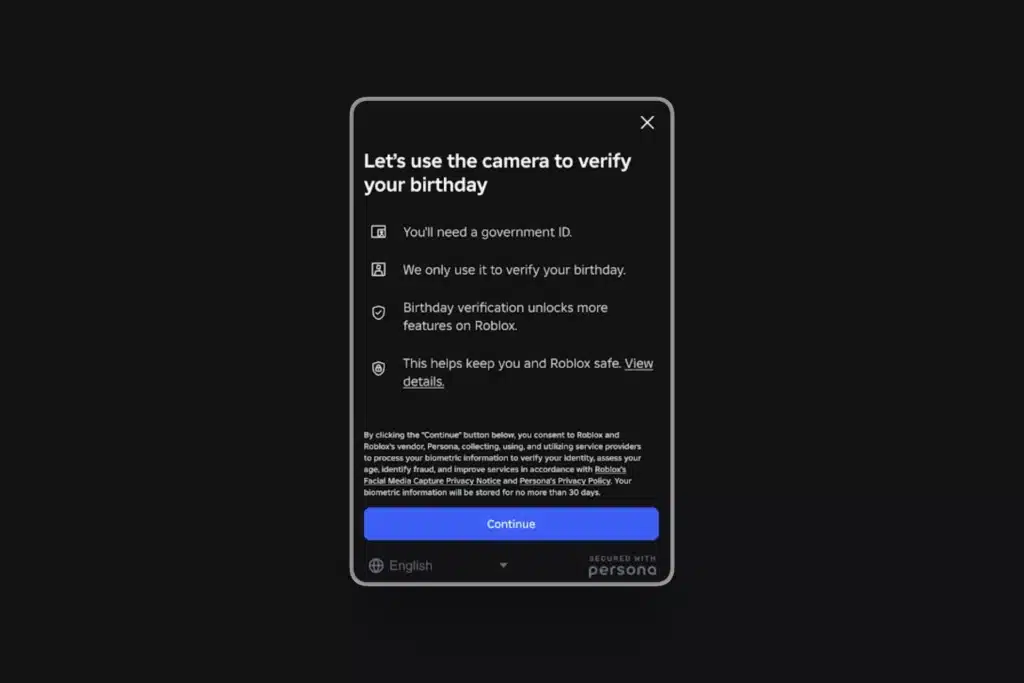
The biggest friction point in this update is the Facial Age Estimation. Here is how to do it and what happens to your data.
The Verification Process
- Open Settings: Go to Settings (gear icon) > Account Info.
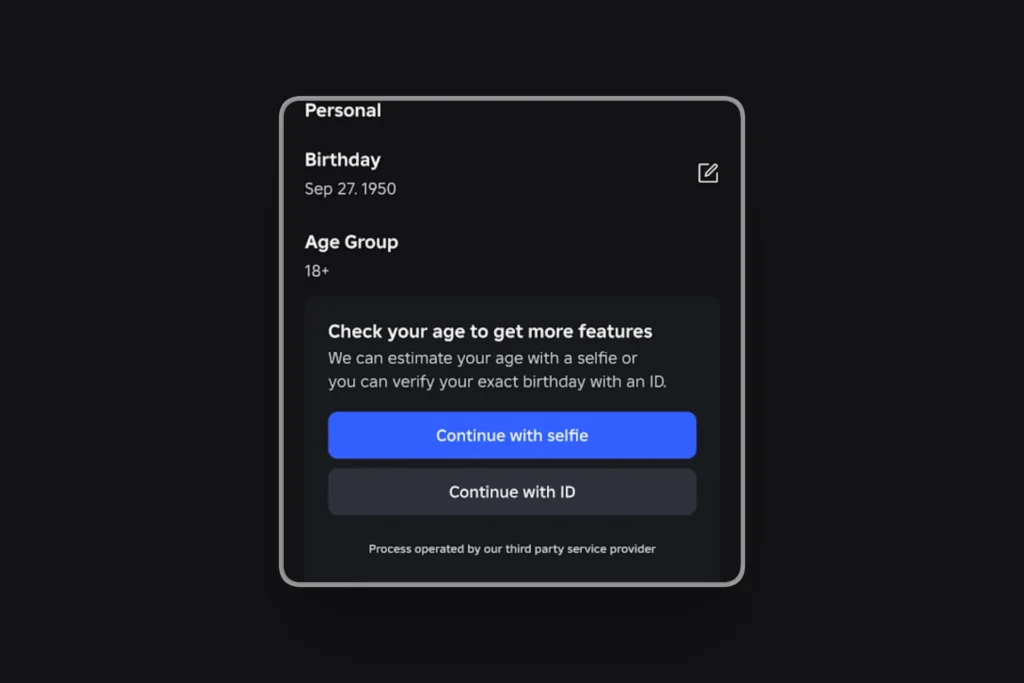
- Start Verification: Under the “Birthday” section, click the Verify My Age button.
- Scan QR: You will be redirected to a QR code. Scan it with your mobile phone to continue the secure session.
- Choose Method:
- Option A (ID Upload): Take a photo of your Passport, Driver’s License, or National ID, followed by a selfie to match.
- Option B (Video Selfie): If you lack ID, use the “Face Scan” option. This uses AI to estimate your age based on facial features.
Privacy Reality Check
- Who processes it? Roblox uses a third-party trusted identity vendor called Persona.
- Is data stored? According to the January 2026 Roblox chat update Privacy Policy, biometric data is used only for the check and is deleted shortly after. It is not stored on Roblox servers permanently.
- Can you bypass it? No. Using a fake ID or a parent’s ID without permission often leads to an instant permanent ban if caught.
3. New Feature: Real-Time AI Translation
While the verification requirements are controversial, the tech upgrades are universally praised. The new Multilingual Chat Model is now live.
- What it does: It translates chat messages in real-time. If you type in English, a player in Brazil sees it in Portuguese, and their reply appears to you in English.
- Latency: The delay is roughly 100 milliseconds, effectively instant.
- How to enable: It is automatic in supported experiences. Look for the “Translated” icon next to chat bubbles.
4. Troubleshooting “Voice Chat is Grayed Out”
If you have verified your age but still cannot use Voice Chat, check these common issues:
- The “Dynamic Head” Conflict: Ensure you have a camera-enabled device connected, if you are using facial tracking features.
- Region Lock: Some regions (e.g. Russia, parts of the Middle East) have Voice Chat disabled due to local VOIP laws, regardless of your age verification status.
- Beta Experiences: Developers must manually enable Voice Chat in their games. If it works in “Roblox Community Space” but not your favorite game, it is the developer’s choice not a bug.
More Read

Conclusion
The January 2026 Roblox chat update marks the end of “wild west” era of anonymous gaming. While handing over a face scan feels invasive to many, it is the price of admission for the platform’s new, more mature social features.
Our Advice: If you are a parent, use the new controls to lock down chat for kids under 10. If you are a player, verify your age using the “Video Selfie” method (it’s faster than ID upload) to get your Voice Chat back immediately.
FAQs
Can I use Voice Chat without an ID?
No, You must use either a government ID or the “Video Selfie” age estimation tool. A verified phone number alone is no longer sufficient for Voice access in many countries as of 2026.
Will Roblox delete my account if I don’t verify?
No, You will simply be restricted to the standard text chat features appropriate for an unverified account. You will not lose your items, Robux or friends list.
Can parents see my private chats?
Parents cannot see the content of private chats through the Parental Control dashboard, but they can see your Friends list and who you have interacted with recently.
What is Expressive Chat?
Expressive Chat refers to the combination of Spatial Voice (proximity chat where volume changes based on distance) and Facial Animation (your avatar mimics your real-life smile/frown via camera). It requires the highest tier of verification.