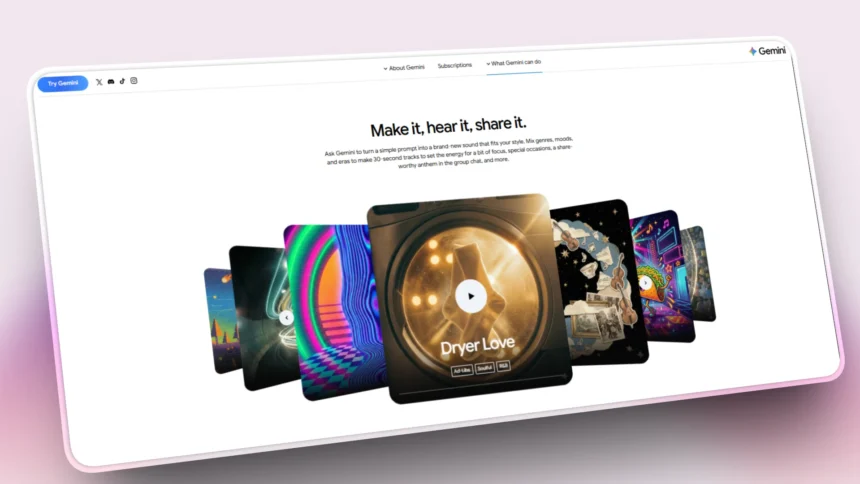

The Google Gemini AI music generator is out now and it has shaken content creation by letting anyone generate professional-sounding 30-second music tracks for free, straight from simple text descriptions, uploaded images or video clips.
Powered by Google’s cutting-edge Lyria 3 model and rolled out globally in the Gemini app as of February 2026, this feature is perfect for YouTubers, TikTok creators, podcasters, gamers and marketers, the Google Gemini AI music generator eliminates the need for expensive music software or composers, delivering royalty-free clips with vocals, lyrics and custom album art in seconds.
What Makes the Google Gemini AI Music Generator Special?
At its core, the Google Gemini AI music generator integrates seamlessly into the Gemini app you already use for AI chats, writing and ideation. No separate app or subscription required, just open Gemini, select the music tool and start creating.
Lyria 3, Google’s most advanced music AI from DeepMind can handles everything like composing melodies, generating lyrics, adding realistic vocals and even matching moods from visuals. It produces full tracks across genres like 90s rap, Latin pop, folk ballads, R&B romance, electronic beats and much more. Safety features include SynthID watermarks for AI detection and filters to prevent mimicking famous artists, ensuring ethical use.
This free rollout to 750M+ Gemini users positions it as a game-changer against paid rivals, especially for short-form content dominating social media in 2026.
Key Features of Google Gemini AI Music Generator
Here’s what you get with this powerful, no-cost tool:
- Multimodal Inputs: Text prompts (“upbeat crypto trading anthem”), images (sunset photo for chill vibes), or videos (match a gaming clip’s intensity).
- Genre & Style Control: Choose from rap, pop, EDM orchestral, lo-fi, trap, or mix them (e.g., “90s rap with folk elements”).
- Vocals & Lyrics: Auto-generate lyrics, select male/female voices or go instrumental.
- Mood Customization: Describe “euphoric,” “dark,” “nostalgic” or “energetic” for tailored results.
- 30-Second Tracks: Ideal length for YouTube Shorts, Instagram Reels, TikTok, podcasts and game montages.
- Instant Remix: Refine outputs like “slower tempo, add piano” for perfect fits.
- Free & Global: Available on Android/iOS/web for adults 18+ (region-dependent).
These features make the Google Gemini AI music generator accessible yet pro-level, boosting creativity without barriers.
How to Use Google Gemini AI Music Generator
Ready to create your first track? Follow this beginner-friendly guide, it takes under 2 minutes:
- Launch Gemini App: Download/update Gemini (Android/iOS) or visit gemini.google.com. Sign in (18+ required).
- Access Music Tool: Tap the sparkle/Tools icon > “Create music” or “Music generation.”
- Input Your Idea:
- Text: “Energetic electronic track for tech review intro, synth-heavy.”
- Image: Upload a Roblox screenshot + “Hip-hop beat matching the action.”
- Video: Short clip of a city drive + “Uptempo R&B with urban vocals.”
- Generate: Hit create, Lyria 3 processes in seconds.
- Preview & Edit: Play the track. Refine: “Make it faster, female singer, add drums.”
- Download/Share: Save MP3, export with AI-generated cover art or share directly.
Pro Tip: Start simple, then layer details for standout results. Test in incognito for fresh outputs.
10 Best Prompts for Google Gemini AI Music Generator
If you’re struggling with ideas? Copy-paste these high-quality prompts tailored for creators:
- “Chill lo-fi beats for coding sessions, soft piano and rain ambiance.”
- “Epic orchestral score for fantasy game trailer, rising strings and horns.”
- “Catchy pop jingle for product launch, upbeat with handclaps.”
- “Dark trap instrumental for PUBG highlights, deep 808s and hi-hats.”
- “Romantic acoustic ballad about AI future, gentle guitar and whispers.”
- “Retro 80s synthwave for neon cyberpunk video, pulsing basslines.”
- “Fun kids’ folk song for Roblox tutorial, ukulele and playful lyrics.”
- “Motivational hip-hop for gym montage, strong beats and rap vocals.”
- “Dreamy ambient track from sunset image, ethereal pads.”
- “Latin pop remix of coffee shop vibe video, rhythmic guitars.”
Use these to build a library, the Google Gemini AI music generator shines with specific, vivid descriptions.
Google Gemini AI Music Generator vs. Competitors (2026 Comparison)
If you’re wondering about how it stacks up? Here’s a quick table:
| Feature | Google Gemini (Lyria 3) | Suno.ai | Udio |
|---|---|---|---|
| Price | Free forever | Limited free; $10/mo | Paid credits |
| Track Length | 30 seconds | 2-4 minutes | Up to 2 min |
| Inputs | Text/Image/Video | Text/Lyrics | Text |
| Vocals/Lyrics | Auto-generated | Customizable | Strong vocals |
| Best For | Social clips/Quick | Full songs | Vocals |
| Extras | SynthID, YouTube link | Stems download | High fidelity |
Real-World Use Cases for Creators & Businesses
- YouTubers/Streamers: Custom intros, transitions, Roblox/PUBG montages.
- Social Media: Viral Reels soundtracks from pet photos or travel vids.
- Marketers: Brand jingles, ad BGM without stock music fees.
- Developers: Prototype audio for Next.js apps or WordPress sites.
- Podcasters: Episode themes matching episode moods.
More Read

Limitations & Best Practices
- 30s Cap: Great for shorts, not albums – use loops for longer needs.
- Beta Variability: Outputs improve with prompt tweaks; generate 3-5 variants.
- Commercial Use: Royalty-free with SynthID disclosure; check YouTube policies.
- Ethics: Credit AI origin; don’t pass as human-made.
FAQs
Is Google Gemini AI music generator completely free?
Yes, no subscription needed for core features.
Can I sell tracks made with it?
Yes, commercially viable with proper attribution.
How to detect if music is AI-generated?
Upload to Gemini for SynthID scan.
What devices work?
Android/iOS apps and web, global rollout ongoing.