
- There are 7 working Archer Training codes right now (September 2026).
- Newest code: starrynight
- Most potions: fivemil (5 of Every Potion)
- Last updated:
Looking for Archer Training codes? We have all 7 working codes for September 2026, including the newest one, starrynight. Redeem them for free Power Potions, Luck Potions, Coin Potions and Spins in Assassin’s Inc’s archery training simulator on Roblox.
This list updates automatically several times a day, so new codes show up here soon after they are released.
All New Archer Training Codes (September 2026)
Tip: Every Archer Training code is all lowercase, and the code box only shows up after you finish the tutorial. Tap a code to copy it exactly.
starrynight= 3 Power Potions (NEW)spiderweb= 3 of Each Potion (NEW)fivemil= 5 of Every Potion (NEW)summerevent= 3 Power Potionsyummy= 3 Power Potionsworldcup= 3 Power Potionszen= 3 Power Potions
Expired Archer Training Codes
These codes no longer work. We keep them here so you don’t waste time trying them.
eventpassmushroomstradingupdatetothemoonbullseyepotionslotsofspinsadminabuse
Enjoying Archer Training? Check our Attack on Titan Revolution Codes, Build a Ring Farm Codes and Cook and Sell Codes too, or browse the full Roblox Game Codes Master List for freebies in every popular game.
How to Redeem Archer Training Codes
- Launch Archer Training on Roblox.
- Complete the tutorial if you are playing for the first time, because the code box stays hidden until you do.
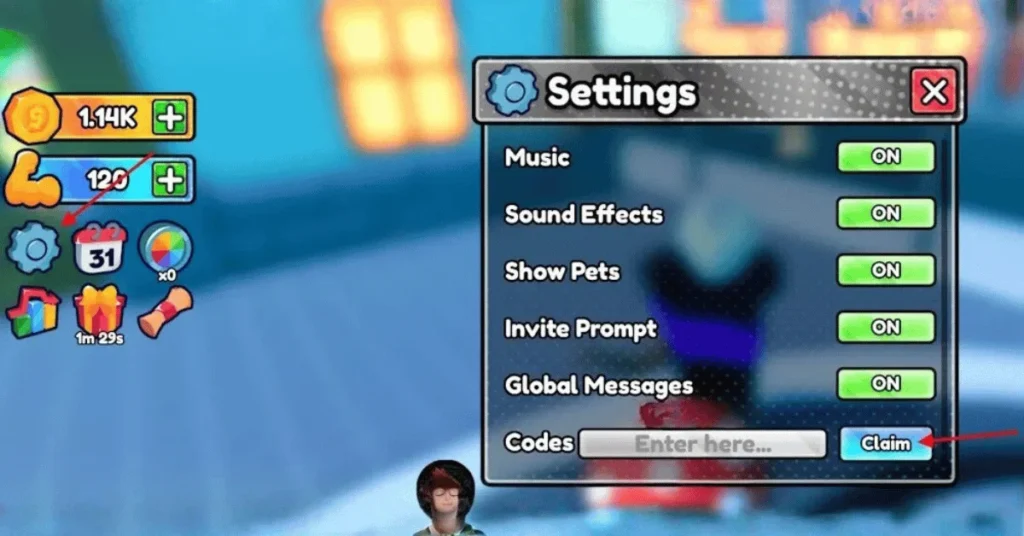
- Click the Settings (gear) icon on the left side of the screen.
- Click the Enter here… box at the bottom of the menu and paste a code.
- Click Claim to get your rewards.
What Do Archer Training Codes Give You?
Here is every reward type you can get from the current codes, and which codes give it.
| Reward | What it does | Codes that give it |
|---|---|---|
| Power Potions | Boost the Power you gain from training so your arrows fly farther. | starrynight, spiderweb, fivemil, summerevent, yummy, worldcup, zen |
| Luck Potions | Better odds of hatching rare pets that multiply your Strength. | spiderweb, fivemil |
| Coin Potions | Earn more money from every shot for a while. | spiderweb, fivemil |
How to Get the Most Out of Your Rewards
- Train before boosting: Potions run on a timer, so train Strength and line up your bow upgrades first, then drink Power Potions when you are ready to shoot for a long session.
- Save Luck Potions for hatching: Rare pets are the biggest Strength multiplier in the game, so pop Luck Potions right before you open a batch of eggs.
- Upgrade bows early: A better bow improves every shot, so put your early money into bows before cosmetic items.
What Is Archer Training on Roblox?
Archer Training is a Roblox archery simulator from Assassin’s Inc. You shoot arrows as far as you can to earn money, train Strength to increase your distance, and spend your earnings on stronger bows and arrows.
The deeper loop comes from hatching rare pets that boost your Strength, using potions to speed up training, trading with other players and unlocking newer worlds like the Underwater World. Each update adds bows, pets and usually a new code.
Why Are My Archer Training Codes Not Working?
- Tutorial not finished: The code box does not appear until you complete the tutorial. Finish it, then open Settings again.
- Capital letters: Every code is lowercase. If your keyboard auto-capitalizes the first letter, the code fails, so paste it instead.
- The code expired: Codes get retired after updates and milestone events, often with no notice. Check the expired list above.
- Already used: Each code works once per account.
- Old server: Codes added in a new update may not work on older servers. Leave the game and join a fresh server.
Found a code that isn’t on our list, or one that stopped working? Let us know here.
How to Get New Archer Training Codes
Assassin’s Inc usually releases new codes with updates, new worlds, events and like milestones, and each code is named after the update it arrives with (starrynight, summerevent, worldcup).
Join the official Archer Training Discord server and the Assassin’s Inc Roblox group, both linked from the game page, to see new codes first. The easier option is to bookmark this page, since it picks up new codes automatically.
Archer Training Codes FAQ
What is the newest Archer Training code?
The newest Archer Training code is starrynight. Other recent additions are spiderweb and fivemil. Redeem new codes quickly because they can expire without warning.
How many working Archer Training codes are there?
There are 7 working Archer Training codes as of September 27, 2026. 8 older codes have expired and no longer work.
Which Archer Training codes give Power Potions?
These codes currently give Power Potions: starrynight, spiderweb, fivemil, summerevent, yummy, worldcup and zen.
How do you redeem codes in Archer Training?
Finish the tutorial first, then click the Settings (gear) icon on the left side of the screen, paste a code into the Enter here box at the bottom and click Claim.
Why are my Archer Training codes not working?
The code has most likely expired, was typed with a mistake, or your server is running an older version of the game. You also need to finish the tutorial before the code box appears. Copy and paste the code exactly, then rejoin a new server and try again.
Why can’t I find the code box in Archer Training?
The code box only appears after you finish the tutorial. Once it is done, click the Settings (gear) icon on the left and scroll to the bottom.
Can you use a Archer Training code more than once?
No. Each Archer Training code works once per Roblox account.